

Redirects seem straightforward: one URL sends users and search engines to another. But choosing the wrong type can quietly disrupt traffic, hinder indexing, and hurt rankings.
One question comes up often: 301 vs. 302 redirects — which one fits your situation best? The answer depends on your goals, the redirect’s duration, and how you want search engines to respond.
Let’s break it down clearly so you can make the right call every time.
Understanding Redirects
A redirect is a way to automatically send both users and search engines from one web address to another. It’s most often used when:
- A page is deleted or consolidated
- URLs are updated during a site migration
- Content is temporarily offline
- Duplicate content or canonical issues need to be resolved
The redirect type you choose influences how search engines process the change.
What Does a 301 Redirect Do?
A 301 redirect signals a permanent move. When used, it tells search engines:
“This content has moved to a new, permanent address. Please index that instead.”
Key points about 301 redirects:
- Best for long-term changes
- Transfers some SEO signals to the new URL
- Eventually removes the old page from search indexes
- Treats the destination URL as the main (canonical) version
Common uses include:
- Restructuring a site’s URL paths
- Redirecting from outdated content to new pages
- Moving from HTTP to HTTPS
- Merging similar or duplicate pages
For SEO, a 301 redirect is usually the safest and most effective option.
What Does a 302 Redirect Do?
A 302 redirect is used for temporary situations. It tells search engines:
“This change is only temporary. Keep the original URL indexed for now.”
Key points about 302 redirects:
- Best for short-term use
- Original URL typically stays in the index
- SEO signals may not fully pass to the redirected page
Typical situations include:
- Running time-sensitive promotions
- Performing A/B tests
- Redirecting for device-specific experiences
- Temporarily removing content while keeping its place in search
Used properly, a 302 redirect will not harm SEO, as long as it aligns with your intent.
Key Differences Between 301 and 302 Redirects
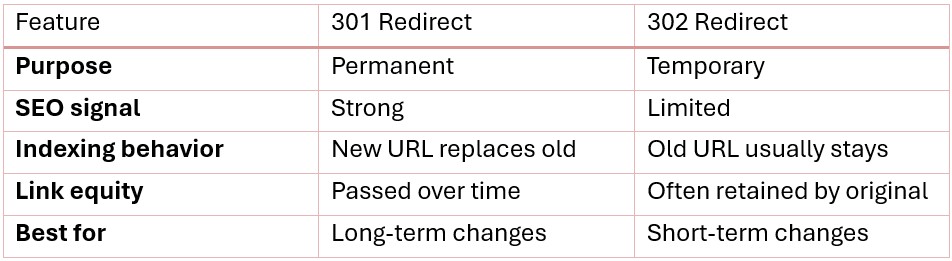
The core issue isn’t which redirect is “better.” It’s whether the redirect type supports your actual goals.
How Redirects Impact SEO and Traffic
Redirects affect:
- How search engines handle indexing
- Whether authority is consolidated or split
If you use a 301 redirect:
- Ranking signals shift to the new URL
- The new page benefits from existing SEO value
- Organic traffic often stabilizes after processing
If you use a 302 redirect:
- Search engines may keep indexing the original URL
- Authority doesn’t entirely shift to the new location
- Traffic can become inconsistent or stall
For long-term results, 301s are usually the better choice.
Common Redirect Mistakes
Here are a few issues that often cause ranking and traffic problems:
Using 302s for permanent changes. If the move is long-term, a 302 can delay search engines from recognizing the new URL. Ranking and authority may not transfer.
Creating redirect chains. Avoid situations where Page A redirects to Page B, which then redirects to Page C. These chains slow down crawling and dilute SEO signals.
Redirecting to irrelevant content. Send users to pages that match their original intent. Otherwise, you risk high bounce rates and lost trust.
Leaving outdated pages live. If a page is no longer helpful, don’t leave it hanging. Redirect it or properly retire it to avoid soft 404s.
When to Use a 301 Redirect
Go with a 301 redirect when:
- A page has been permanently removed
- You’re changing URL structures
- You’re consolidating duplicate or thin content
- You want to pass full SEO value to a new location
Ask yourself: “Will this change still be true in six months?” If yes, use a 301.
When to Use a 302 Redirect
Use a 302 redirect when:
- The change is temporary
- The original page will return soon
- You’re running tests or limited-time campaigns
- You want search engines to keep indexing the original URL
If the page is coming back as-is, a 302 is the safer choice.
How Google Treats 301 vs. 302 Redirects
Google’s systems are better now at understanding redirect intent. But consistency still matters.
If a 302 remains in place for months, Google may treat it like a 301 anyway. That said, it’s best to send a clear signal by choosing the right type upfront.
Making the Right Redirect Decision
Here’s a simple guide:
- Permanent change? Use a 301 redirect.
- Temporary change? Use a 302 redirect.
Redirects are more than a technical step. They shape how search engines view your site’s structure and how users experience your content.
Need Help Managing Redirects?
At Menerva Digital, we handle redirect strategies for complex migrations and content reorganizations. We:
- Audit redirect health across your site
- Find and fix redirect chains and misused 302s
- Map redirects for site structure and search intent
- Help ensure traffic and rankings stay intact through changes
If you’re making major updates or want to clean up your existing setup, let us help you get redirects right from the start. Contact us today!